HIPAA Compliant AWS Architecture for Medical Device Software
By Emil Tejeda
Signing the AWS Business Associate Addendum takes about three clicks in the console. That's where most "HIPAA on AWS" guides stop. For ContourCompanion, a Class II AI SaMD processing DICOM CT data to generate radiation therapy contours, the BAA was the starting line. The actual work was building an architecture where every service that touches Protected Health Information is HIPAA-eligible, every data path is encrypted, every access is logged, and every infrastructure decision maps to a specific regulatory requirement.
The FDA has not issued standalone guidance on cloud computing for medical devices. Cloud architecture is addressed indirectly through the September 2023 cybersecurity guidance, the OTS software guidance, and AAMI/CR510:2021 (Appropriate Use of Public Cloud Computing for Quality Systems and Medical Devices). That last one is the closest thing to an industry standard for cloud-hosted medical devices, and FDA's cybersecurity guidance references it directly. The regulatory picture is assembled from pieces, not read from a single document.
This post covers how we assembled those pieces into a HIPAA compliant AWS architecture for a production SaMD.
AWS Multi-Account Strategy with Control Tower
A single AWS account for everything is how teams get into trouble. One overprivileged IAM user, one misconfigured resource policy, and the blast radius is the entire workload: production data, audit logs, infrastructure pipelines, billing. For a medical device, that blast radius includes PHI and FDA submission evidence.
AWS Control Tower provisions a multi-account landing zone with guardrails baked in from day one. We stood up the landing zone with five accounts, each with a distinct security boundary:
| Account | Purpose | Key Controls |
|---|---|---|
| Management | Organizations root, Control Tower, billing | No workloads, no PHI. SCPs applied here propagate to all child accounts |
| Production | ECS workloads (EC2 GPU), RDS, S3 DICOM staging | BAA signed, HIPAA-eligible services only for PHI paths |
| Staging | Pre-production environment, integration testing | Mirrors production config, synthetic data only (no PHI) |
| Log Archive | CloudTrail logs, VPC Flow Logs, Config snapshots | S3 Object Lock Compliance Mode, no human write access |
| Audit | AWS Config aggregator, Security Hub, Audit Manager | Read-only cross-account access to all accounts |
Control Tower deploys Service Control Policies (SCPs) across the organization. SCPs are permission boundaries that no IAM policy can override. We added custom SCPs on top of the Control Tower defaults:
- Deny non-HIPAA-eligible services in the production account. If an engineer tries to create a Lightsail instance or a WorkSpaces desktop in the production account, the API call fails at the organization level. The IAM policy is irrelevant.
- Deny CloudTrail modifications in all accounts. Nobody, including account administrators, can stop the trail, delete log files, or disable integrity validation.
- Deny S3 public access organization-wide. The S3 Block Public Access setting is enforced by SCP, not just by bucket policy.
- Restrict regions to us-east-2 (primary) and us-west-2 (DR). No resources can be created in other regions. This prevents shadow infrastructure and simplifies compliance scope.
The separation between the production account and the log archive account is the most important boundary. If the production account is fully compromised, the attacker cannot reach the audit trail. The log archive account has its own root credentials, its own IAM boundaries, and SCPs that deny all write operations except from the CloudTrail service principal. The only humans with access to the log archive are auditors operating through Identity Center with read-only permission sets.
IAM Identity Center (SSO)
There are no IAM users anywhere in the organization. Zero. Every human authenticates through IAM Identity Center (formerly AWS SSO), which provides centralized authentication with MFA enforcement, temporary credentials for every session, and permission sets that map to specific accounts and roles.
Permission sets replace the traditional model of long-lived IAM access keys. When an engineer needs to access the production account, they authenticate through Identity Center, select the account and permission set, and receive temporary credentials that expire after one hour. No access keys stored in ~/.aws/credentials. No shared accounts. Every API call in CloudTrail traces back to a named individual, not a generic service account.
We defined four permission sets:
| Permission Set | Scope | Access Level |
|---|---|---|
| Developer | Staging account | Read/write to ECS, ECR, S3, CloudWatch. No RDS admin, no IAM changes |
| Operator | Production account | Read-only. Can view logs, metrics, task status. Cannot modify resources |
| BreakGlass | Production account | Time-limited admin. Requires MFA re-challenge. Triggers instant alarm |
| Auditor | Log Archive + Audit accounts | Read-only. CloudTrail queries, Config rules, Security Hub findings |
The break-glass permission set deserves its own section (below). The key property of Identity Center is that it eliminates the class of credentials that cause the majority of AWS security incidents: long-lived access keys committed to Git, shared between team members, or left active after an employee departs.
For 21 CFR Part 11 §11.10(d), Identity Center's audit trail of every authentication event, combined with CloudTrail's record of every API call, provides the "limiting system access to authorized individuals" evidence that FDA reviewers expect. The mapping is direct: named person authenticates, receives scoped temporary credentials, performs actions logged with their identity.
The AWS Shared Responsibility Model for Medical Devices
The AWS Shared Responsibility Model divides security obligations between AWS and the customer. AWS secures the cloud itself: physical data centers, network infrastructure, hypervisor, host operating system. The customer secures everything in the cloud: application code, IAM configuration, encryption settings, network rules, and all compliance controls specific to the workload.
For medical devices, this model has a regulatory layer on top. The FDA holds the device manufacturer responsible for the safety and security of the entire system, including the cloud infrastructure. AWS doesn't appear in your 510(k) submission as a responsible party. You do. If a misconfigured security group exposes PHI, the FDA views that as a design defect in your device, not an AWS problem. The GxP Systems on AWS whitepaper frames it as "security and quality OF the cloud" (AWS) versus "security and quality IN the cloud" (customer).
What shifts when the workload is a medical device:
| Layer | AWS Responsibility | Your Responsibility |
|---|---|---|
| Physical infrastructure | Data center security, hardware, networking | None |
| Platform services (RDS, ECS) | OS patching, platform availability | Data encryption, access control, backup config |
| Compute (EC2, Fargate) | Hypervisor, Firecracker isolation | Application security, container image hardening |
| Application | Nothing | Everything: code, DICOM handling, inference, PHI controls |
| Compliance evidence | SOC 2, ISO 27001, HITRUST via Artifact | FDA submission, 21 CFR Part 11, risk management, IQ/OQ |
The compliance evidence row is where teams miscalculate. AWS provides SOC 2 Type II reports, ISO 27001 certificates, and HITRUST CSF certifications through AWS Artifact, all free to download. Those documents prove AWS meets its half of the shared responsibility model. They don't prove your application is compliant. Your FDA submission needs to show how you configured those services, not just that AWS passed its audit. We used the Artifact reports as supplier qualification evidence for the ISO 14971 risk management file, feeding them into the risk assessment of cloud infrastructure as a SOUP item under IEC 62304.
HIPAA Eligible Services: What the BAA Actually Covers
AWS offers 166+ HIPAA-eligible services. The BAA, executed through AWS Artifact, establishes AWS as a Business Associate under HIPAA. But the BAA only covers services on the eligible list. You can use any AWS service in a HIPAA-designated account, but you may only process, store, or transmit PHI through HIPAA-eligible services. The SCP we described above enforces this at the organization level, making it impossible to accidentally provision a non-eligible service in the production account.
For ContourCompanion, the core services handling PHI:
| Service | PHI Role | Why This One |
|---|---|---|
| ECS on EC2 (GPU) | Runs inference containers on G4dn/G5 instances | GPU acceleration for DICOM segmentation, coordinator-managed scaling |
| ECS on Fargate | Web UI, upload service, distributor | Firecracker micro-VM isolation, zero OS patching |
| ECR | Stores container images | Immutable tags, image scanning on push |
| RDS (PostgreSQL) | Patient metadata, OAR configurations | KMS encryption, Multi-AZ, automated backups |
| S3 | DICOM staging, audit log archive | SSE-KMS, Object Lock, cross-region replication |
| ALB | TLS termination for inbound DICOM | ACM-managed certificates, TLS 1.2+ enforced |
| WAF | Application-layer protection | OWASP managed rules, rate limiting, geo-restriction |
| Route 53 | DNS with health checks | Failover routing to DR region |
| KMS | Encryption key management | Customer-managed keys for all PHI stores |
| CloudTrail | API audit logging | SHA-256 integrity, org-wide trail to log archive account |
| CloudWatch | Operational metrics and alarms | Break-glass alerts, no PHI in metrics |
| Secrets Manager | Database credentials, API keys | KMS encryption mandatory, auto-rotation |
| Systems Manager | Break-glass session access | Keystroke logging to log archive, no SSH |
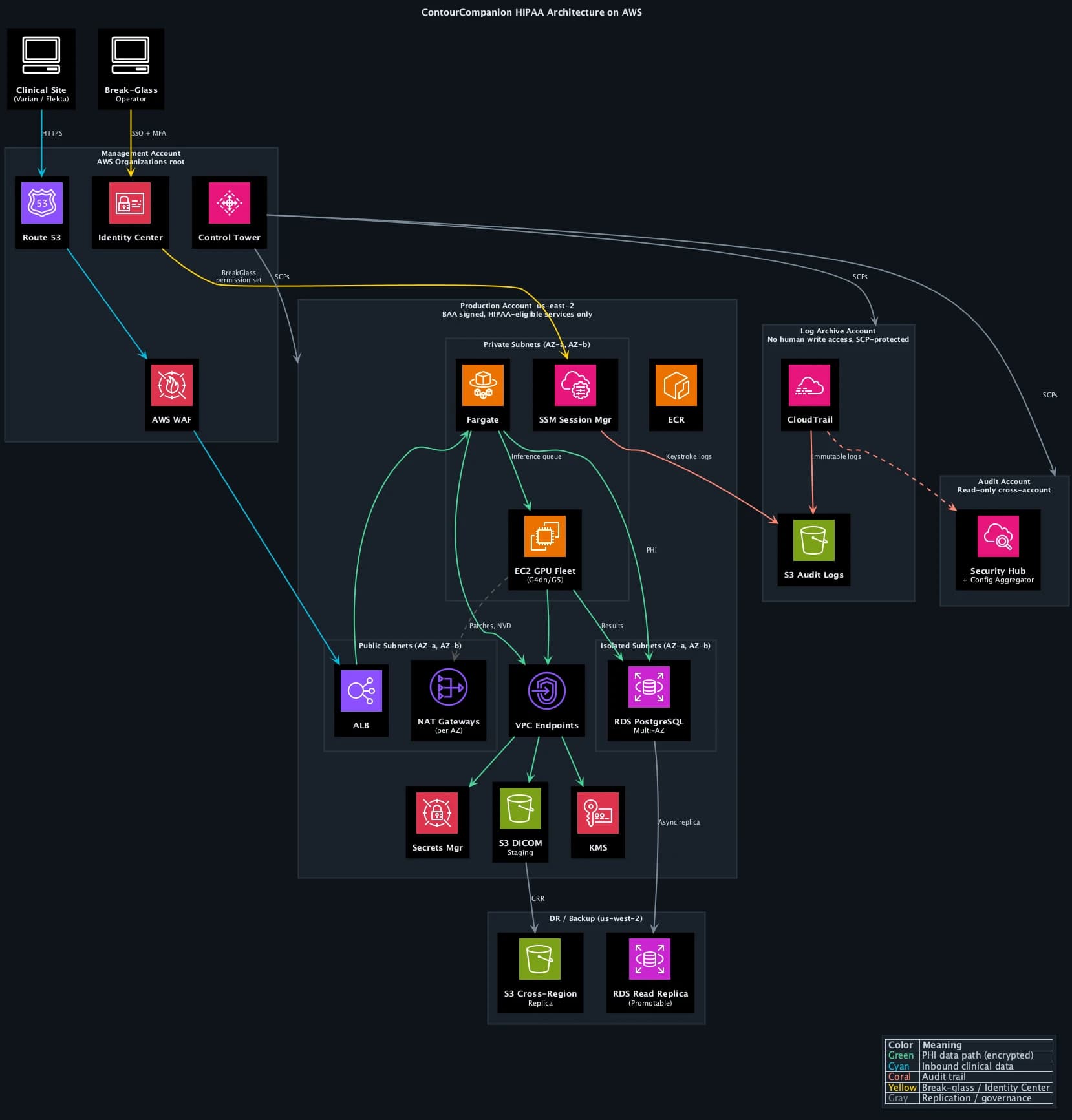
The compute layer is split by workload type. The web UI, upload service, and distributor run on ECS Fargate. Fargate uses Firecracker micro-VMs with dedicated CPU, memory, and network per task. No shared infrastructure, no OS patches, no host management. For services that handle request routing and file staging, Fargate's simplicity is the right trade-off.
Inference is a different story. Autocontouring CT volumes requires GPU acceleration. Running that on Fargate would mean paying for on-demand GPU capacity at Fargate's pricing premium, which is brutal at GPU tier. We built a coordinator service that manages an EC2 Auto Scaling group of G4dn/G5 GPU instances. The coordinator watches the inference queue depth and historical load patterns (radiation oncology departments have predictable scheduling: weekday mornings are peak, nights and weekends are near-zero). It scales the GPU fleet up before the morning rush and back down to a minimum capacity overnight. This cut GPU compute costs by roughly 60% compared to keeping instances running 24/7 or paying Fargate's on-demand premium.
The coordinator runs on Fargate itself (it's a lightweight service, no GPU needed) and uses ECS capacity providers to manage the EC2 fleet. When a new DICOM study arrives, the coordinator checks available GPU capacity, spins up additional instances if the queue is backing up, and places the inference task on the next available GPU host. The EC2 instances run Amazon ECS-optimized AMIs with the NVIDIA GPU driver baked in, hardened with CIS benchmarks, and encrypted EBS volumes. OS patching on these instances is automated through SSM Patch Manager on a weekly cadence, with patching windows aligned to low-traffic periods.
EKS would have given us more scheduling flexibility for the GPU workloads, but added Kubernetes operational overhead that a startup team doesn't need. ECS capacity providers gave us the same bin-packing and scaling behavior with a fraction of the configuration surface. The regulatory isolation properties were equivalent. The time saved on Kubernetes operations went directly to IEC 62304 compliance work.
Encryption Architecture for PHI
HIPAA requires encryption of PHI both at rest and in transit. The HIPAA Security Rule doesn't specify encryption algorithms, but the FDA's cybersecurity guidance expects current standards. We used AES-256 for data at rest and TLS 1.2+ for data in transit.
At rest
Every service storing data got a customer-managed KMS key. Not AWS-managed keys, not default encryption. Customer-managed keys give you control over key rotation policy, key deletion scheduling, and CloudTrail logging of every key usage event. When an auditor asks "who accessed the encryption key protecting patient data on this date," the answer is a CloudTrail query, not a shrug.
The encryption configuration:
- RDS PostgreSQL: Encrypted at instance creation with a dedicated KMS key. You cannot enable encryption on an existing unencrypted RDS instance. Get this right on day one.
- S3 buckets: SSE-KMS with bucket policies that deny any
PutObjectrequest missing server-side encryption headers. Belt and suspenders. - EBS volumes: Account-wide default encryption enabled. Every volume, every region, no exceptions.
- Secrets Manager: KMS encryption is mandatory, you can't turn it off. Credentials auto-rotate on a schedule. Database connection strings never appear in environment variables or config files.
In transit
TLS 1.2 minimum on every network path that carries PHI. The ALB terminates TLS with ACM-managed certificates. Internal service-to-service communication within the VPC uses TLS as well. VPC endpoints provide private connectivity to AWS services (S3, KMS, ECR) without traversing the public internet.
One detail that catches teams: DICOM communication. The DICOM standard predates TLS. Traditional DICOM uses unencrypted TCP on port 104. ContourCompanion's DICOM ingestion pipeline wrapped all DICOM traffic in TLS-encrypted channels. Clinical sites connecting to ContourCompanion never sent unencrypted PHI over the network.
Network Architecture: Isolating PHI Data Paths
The VPC design followed a three-tier pattern across two Availability Zones in us-east-2, mapping subnet boundaries to data sensitivity.
Why us-east-2, not us-east-1
us-east-1 (N. Virginia) has the broadest service catalog but also the highest incident frequency of any AWS region. It's the oldest, the largest, and the most likely to experience capacity pressure during major events. For a medical device where uptime directly affects clinical workflow, the marginal service availability advantage of us-east-1 doesn't justify the elevated risk. us-east-2 (Ohio) has every HIPAA-eligible service ContourCompanion requires and a significantly cleaner operational track record. Friends don't let friends deploy medical devices in us-east-1.
Three-tier subnet isolation
The public subnets hold only the ALB and NAT gateways (one per AZ for redundancy). No compute instances, no databases, no PHI storage. AWS WAF sits in front of the ALB with OWASP managed rule groups, rate limiting, and geo-restriction to block traffic from regions where ContourCompanion has no clinical users. The ALB accepts inbound HTTPS, terminates TLS, and forwards to private subnets.
The private subnets run both ECS Fargate tasks (web UI, upload service, distributor, coordinator) and ECS EC2 GPU instances (inference). No internet gateway route. Outbound internet access (for pulling container images, NVD vulnerability checks, SSM Patch Manager) routes through the NAT gateway. Security groups restrict traffic to the minimum required ports between services. Both Fargate tasks and EC2 instances spread across both AZs, so losing an AZ doesn't lose compute capacity.
The isolated subnets contain only the RDS PostgreSQL cluster. No NAT gateway route, no internet path in either direction. Database traffic flows exclusively from the application tier's security group on the PostgreSQL port. RDS runs in Multi-AZ configuration: a synchronous standby replica in the second AZ with automatic failover. If the primary AZ goes down, RDS promotes the standby with no data loss and no manual intervention.
VPC endpoints and private connectivity
VPC endpoints eliminated internet traversal for all AWS API calls. S3, KMS, ECR, CloudWatch, Secrets Manager, Systems Manager, and CloudTrail all connect through interface or gateway endpoints within the VPC. PHI never leaves the AWS network backbone. This also removes the NAT gateway as a single point of failure for AWS service access, since VPC endpoints route through the AWS private network independently.
Route 53 and edge protection
Route 53 health checks monitor the ALB endpoint. If the primary region becomes unhealthy, failover routing directs traffic to a static maintenance page (or, in a full active-passive setup, to the DR region's ALB). Health check intervals are 10 seconds with a 3-check threshold, meaning failover triggers within 30 seconds of a regional issue.
Break-Glass Access via Systems Manager
SSH is disabled on all infrastructure. There are no bastion EC2 instances with key pairs. Shell access goes exclusively through AWS Systems Manager Session Manager, accessed via Identity Center's break-glass permission set.
The break-glass flow:
- Engineer authenticates through Identity Center with MFA. Selects the BreakGlass permission set for the production account.
- Identity Center issues temporary credentials (60-minute maximum session).
- The
AssumeRoleevent fires a CloudWatch alarm via EventBridge. The engineering team is notified via SNS within seconds, before the operator's first command. - The operator starts an SSM session to the target EC2 GPU instance or uses ECS exec for Fargate tasks. No inbound security group rules needed because SSM connects outbound through the VPC endpoint.
- Every keystroke is logged to the log archive account's S3 bucket with the same encryption and Object Lock immutability as the CloudTrail audit trail.
- After 60 minutes, the session and credentials expire automatically. No manual cleanup.
The break-glass permission set grants read-only access by default. If the operator needs to modify data or restart a service, they must assume a separate write-scoped role with a second MFA challenge, logged as a distinct CloudTrail event. This separation means an operator can investigate a production issue without the ability to alter data, and the audit trail distinguishes investigation from intervention.
For 21 CFR Part 11, the SSM session log maps directly to §11.10(d) (limiting system access to authorized individuals) and §11.10(e) (secure, computer-generated, time-stamped audit trails). The session transcript, combined with the Identity Center authentication event and CloudTrail API log, forms a complete chain: who authenticated, what role they assumed, what commands they ran, and when the session ended.
Resilience and Disaster Recovery
A medical device that's offline disrupts clinical workflow. Radiation oncology departments plan treatment schedules days in advance. If the autocontouring service is unavailable when a physicist needs it, the fallback is manual contouring, which adds hours per patient. The architecture has to account for AZ failures, regional degradation, and data durability across failure scenarios.
Multi-AZ by default
Every stateful component runs across two Availability Zones in us-east-2:
- RDS PostgreSQL: Multi-AZ with synchronous replication. Automatic failover, zero data loss, ~60 second promotion time.
- ECS Fargate (web/services): Tasks distributed across AZs by the ECS scheduler. Minimum healthy percentage set to 100%, so capacity is maintained during rolling deployments.
- ECS EC2 GPU (inference): Auto Scaling group spans both AZs. The coordinator maintains minimum capacity in each AZ, so a single AZ failure doesn't eliminate inference capacity.
- NAT Gateways: One per AZ. If an AZ loses its NAT gateway, the other AZ's tasks continue reaching external endpoints.
- ALB: Cross-zone load balancing enabled. A single unhealthy AZ doesn't affect request routing to healthy targets.
Cross-region backup to us-west-2
The DR region (us-west-2) holds two things: an S3 cross-region replica and a promotable RDS read replica.
S3 cross-region replication (CRR) copies every DICOM object and audit log to us-west-2 within 15 minutes. The replica bucket has its own KMS key (KMS keys are regional) and its own Object Lock configuration. If the primary region suffers a sustained outage, the data exists independently in us-west-2.
The RDS cross-region read replica uses asynchronous replication. Under normal operation, replica lag is under 1 second. In a regional disaster, the read replica can be promoted to a standalone primary. This is a manual operation because automatic cross-region failover for RDS requires Aurora Global Database, which was architectural overkill for ContourCompanion's write volume. The RTO for cross-region failover is measured in minutes, not hours (promote replica, update Route 53, verify connectivity).
Recovery objectives
| Scenario | RTO | RPO |
|---|---|---|
| Single AZ failure | ~60 seconds (automatic) | Zero |
| Primary region degradation | ~15 minutes (manual promotion) | < 1 minute (async replication lag) |
| Data corruption | Point-in-time recovery within 35-day window | < 5 minutes |
These targets were documented in the risk management file as design inputs and verified during infrastructure qualification testing.
Audit Trails: 21 CFR Part 11 on AWS
21 CFR Part 11 requires secure, computer-generated, time-stamped audit trails that record the identity of the operator, the action taken, and when it happened. For a cloud-hosted medical device, that means logging every infrastructure change, every data access, and every application event that affects electronic records.
CloudTrail is the foundation. We configured it as an organization-wide multi-region trail with log file integrity validation enabled. Integrity validation uses SHA-256 hashing and SHA-256 with RSA digital signing, making it computationally infeasible to modify, delete, or forge log entries without detection.
Logs deliver to the log archive account, the dedicated account in the Control Tower landing zone with no human write access. SCPs prevent anyone in any account from stopping the trail or modifying its delivery configuration. The log bucket uses S3 Object Lock in Compliance Mode, which prevents anyone, including the root account of the log archive, from deleting log files before the retention period expires. The only way to remove a compliance-locked object early is to delete the entire AWS account. That's the level of immutability regulators expect.
The audit account runs AWS Security Hub with the HIPAA and CIS Benchmarks enabled, aggregating findings across all accounts. AWS Config rules in each account feed into a central Config aggregator in the audit account, providing a single-pane view of compliance posture across the organization.
The 21 CFR Part 11 mapping:
| Part 11 Requirement | AWS Implementation |
|---|---|
| §11.10(a) Validation | AWS Config conformance pack for Part 11; IQ/OQ scripts against deployed infrastructure |
| §11.10(d) Access control | Identity Center with MFA, permission sets scoped per account, break-glass role with SSM logging |
| §11.10(e) Audit trails | Org-wide CloudTrail to log archive account, S3 Object Lock, integrity validation |
| §11.10(g) Authority checks | SCPs at organization level, IAM condition keys, permission set boundaries |
AWS Audit Manager provides a prebuilt 21 CFR Part 11 framework that maps Config rules to Part 11 requirements. We used it to generate continuous compliance evidence rather than running periodic manual audits. The compliance posture was always current, not a snapshot from three months ago.
Infrastructure Qualification: Proving the Cloud Works
The 510(k) submission doesn't require you to validate AWS itself. AWS is a SOUP item under IEC 62304, and you manage it through supplier qualification (SOC 2 reports, ISO certificates) plus your own risk assessment. What the FDA does expect is evidence that your specific configuration of AWS services meets your design requirements.
We structured this as an Installation Qualification (IQ) script that verified the deployed infrastructure against the architecture specification. The script checked:
- Control Tower landing zone active with all five accounts
- SCPs enforcing region restriction, HIPAA-eligible service allowlist, and CloudTrail protection
- Identity Center configured with expected permission sets, no IAM users in any account
- Encryption enabled on every data store with customer-managed KMS keys
- Security groups matching the approved configuration (no 0.0.0.0/0 rules, port-level restrictions)
- RDS Multi-AZ active with automated backups and cross-region replica connected
- CloudTrail active with integrity validation in all regions, delivering to log archive account
- S3 cross-region replication active with Object Lock on both source and replica
- WAF rules attached to the ALB with expected managed rule groups
- VPC endpoints operational for all required services
- Break-glass permission set configured with correct session duration and MFA requirement
This ran after every infrastructure deployment through CDK, producing a timestamped verification record.
The verification evidence fed directly into the risk management traceability chain: infrastructure risk controls traced to verification tests, which traced to IQ results. When FDA reviewers asked "how do you know your cloud infrastructure meets your security requirements," the answer was an automated test suite with continuous evidence, not a manual checklist someone ran once before submission.
Infrastructure as Code made this possible. Because the entire infrastructure was defined in CDK with cdk-nag HIPAA packs catching compliance violations at synthesis time, the gap between "what we designed" and "what's deployed" was always zero. The CDK code was the architecture document. The deployed infrastructure was its verified output. Post 6 in this series covers Infrastructure as Code for regulated environments in detail.
Frequently Asked Questions
Is AWS HIPAA compliant?
AWS itself is not "HIPAA compliant" in any certification sense. HIPAA has no certification program. AWS signs a Business Associate Addendum (BAA) and provides 166+ HIPAA-eligible services that can be used to process PHI. The customer is responsible for configuring those services correctly, implementing access controls, enabling encryption, and maintaining audit trails. AWS provides the tools. Compliance is your responsibility.
What is a BAA with AWS?
A Business Associate Addendum (BAA) is a contract between a covered entity (or another business associate) and AWS that establishes AWS's obligations for handling PHI under HIPAA. You execute it through AWS Artifact in the Management Console. The BAA only covers HIPAA-eligible services. Using a non-eligible service to process PHI is a HIPAA violation regardless of whether you've signed the BAA.
Which AWS services are HIPAA eligible?
AWS maintains an official list of HIPAA-eligible services that includes 166+ services as of 2025. Key services for medical device software: ECS, EKS, Fargate, ECR, S3, RDS, DynamoDB, Lambda, KMS, CloudTrail, CloudWatch, SageMaker, HealthImaging, and HealthLake. The list updates frequently, so check it before making architecture decisions.
Do I need HIPAA compliance for a SaMD?
If your SaMD processes, stores, or transmits Protected Health Information (PHI), such as patient imaging data, demographics, or clinical data, then yes. Most SaMD that integrates with clinical systems handles PHI. Even if you de-identify data before processing, you need HIPAA controls on the ingestion pipeline that receives identified data. ContourCompanion processes DICOM CT data containing patient identifiers, so HIPAA applied to the entire data path from ingestion through inference to result delivery.
References
- AWS Shared Responsibility Model
- AWS HIPAA Compliance
- HIPAA Eligible Services Reference
- AWS Artifact
- GxP Systems on AWS Whitepaper
- 21 CFR Part 11 — Electronic Records
- AWS Audit Manager — 21 CFR Part 11 Framework
- FDA Cybersecurity Guidance for Medical Devices (September 2023)
- AAMI/CR510:2021 — Appropriate Use of Public Cloud Computing for Medical Devices
- AWS Control Tower
- IAM Identity Center
- Service Control Policies
- AWS Security Hub
- AWS Systems Manager Session Manager
- AWS Well-Architected Framework — Reliability Pillar
- S3 Object Lock
- AWS CloudTrail Security Best Practices
SaMD Engineering
Part 5 of 11
- 1.What Is SaMD? Software as a Medical Device Explained
- 2.FDA Pathways for SaMD: 510(k) vs De Novo vs PMA
- 3.IEC 62304 in Practice: Medical Device Software Without the Waterfall
- 4.ISO 14971 Risk Management for SaMD: What FDA Reviewers Read
- 5.HIPAA Compliant AWS Architecture for Medical Device Software
- 6.Infrastructure as Code for Medical Devices: IQ OQ PQ with AWS CDK
- 7.Medical Device Cybersecurity: FDA Guidance, SBOMs, and Threat Modeling
- 8.Design Controls for Medical Devices: 21 CFR 820.30 in Practice
- 9.AI/ML SaMD: FDA Artificial Intelligence Guidance in Practice
- 10.PCCP for AI SaMD: FDA Predetermined Change Control Plans
- 11.SaMD Engineering Toolchain: How Small Teams Ship FDA-Cleared Software